Why Jreng Delivers the Bold Touch Your Design Needs
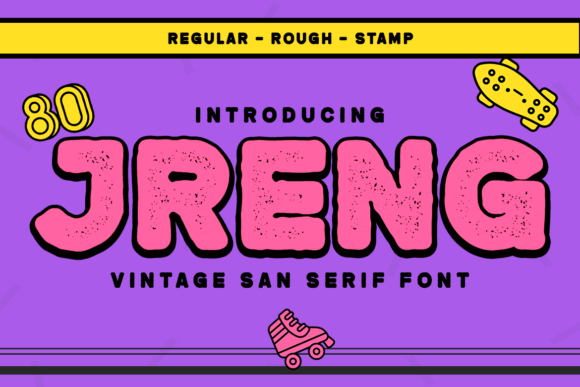
When you are staring at a blank canvas or a new project file, the difference between a design that feels professional and one that looks amateur often comes down to typography. Many creators rush through this step, grabbing whatever standard font is available on their system. This approach frequently leads to flat, forgettable results. Jreng offers a distinct alternative for those ready to stop blending in. It is a rough textured and thick lettered display font designed to make an immediate statement.
This typeface is not merely a collection of characters; it is a tool for impact. Its unique texture mimics the feel of worn surfaces, while its heavy weight commands attention without requiring loud colors or chaotic layouts. Whether you are designing web interfaces, printing business cards, or creating marketing materials, Jreng provides the structural backbone needed for projects that require a bold touch. However, simply downloading the file is not enough to guarantee success. Understanding how to apply it correctly prevents common pitfalls that can ruin even the most promising creative concepts.
The Trap of Overusing Display Fonts
A frequent mistake beginners make with fonts like Jreng is assuming that because it is bold and textured, it should be used everywhere. The temptation is strong. You want your headlines to pop, so you might be inclined to set entire paragraphs or body text in this style. This is a critical error. Display fonts are engineered for short bursts of visual energy, not for reading long passages of text.
If you fill a document with thick, rough letters, you create visual fatigue. The texture distracts the eye, making it difficult to process information efficiently. In a business context, this can lead to confusion rather than clarity. A website with a paragraph of Jreng will look cluttered and unprofessional, potentially causing visitors to leave before they find what they need. The goal of typography is communication, not just decoration. When you prioritize readability over style, your message actually gets stronger.
- Limit usage: Reserve Jreng for headlines, logos, pull quotes, and key call-to-action buttons.
- Pair wisely: Always balance the rough texture of Jreng with clean, simple sans-serif or serif fonts for body copy.
- Watch the weight: Ensure the contrast between the display font and your supporting text is significant enough to maintain hierarchy.
Understanding Texture and Legibility
The defining characteristic of Jreng is its rough texture. While this adds character and a tactile quality to your design, it also introduces complexity. Unlike smooth vector fonts where every pixel is crisp, Jreng has intentional irregularities. If you scale this font down too small, these details blur together, turning into a muddy gray blob that is impossible to read. This is a common oversight when designers try to force the font into tight spaces like footers or small captions.
To avoid this, always preview your work at 100% zoom before finalizing. Check how the texture behaves at different sizes. If the rough edges start to disappear or the letters merge, you have gone too small. Conversely, if you use it for large banners, ensure the resolution of your output device can handle the detail. Printing a low-resolution version of a thick, textured font can result in jagged edges that look like errors rather than artistic choices. Quality control here directly impacts the perceived value of your brand.
Pitfalls in File Selection and Licensing
Before you even open your design software, you must consider the source of your font. The internet is filled with free downloads, but not all are created equal. Some versions of popular styles may lack proper kerning pairs or contain missing glyphs. Using a "broken" version of Jreng can cause alignment issues where letters overlap awkwardly or spacing looks inconsistent. This lack of polish undermines the professional appearance you are trying to achieve.
Furthermore, licensing is a non-negotiable aspect of using commercial typefaces. Many users assume that because a font is available online, they can use it for any purpose, including client work or commercial products. This assumption can lead to legal trouble. If you are a freelancer or running a business, you need to verify that your license covers the specific use case. For example, a desktop license might allow you to design a logo, but using that same logo on a t-shirt or a mobile app could require a separate extension. Ignoring these details puts your reputation and finances at risk.
- Verify the provider: Download from reputable foundries or trusted marketplaces to ensure file integrity.
- Check the license terms: Read the fine print regarding web embedding, print runs, and merchandise.
- Test compatibility: Ensure the font files work seamlessly across your operating systems and design tools.
Color Choices That Clash with Texture
Once you have the right file and license, the next challenge is color pairing. Because Jreng is already visually heavy due to its thickness and texture, adding bright neon colors or overly complex gradients can overwhelm the viewer. A common mistake is treating the font as a background element by applying busy patterns behind it. This creates a vibrating effect that strains the eyes and reduces legibility.
The best approach is to let the texture do the work. Use solid, neutral backgrounds to let the rough edges of the letters stand out. If you need to add color, choose shades that complement the mood of the texture—think earth tones, deep blues, or stark blacks and whites. The goal is to enhance the boldness of the letters, not compete with them. When you simplify the color palette, the typography becomes the hero of the design, ensuring your message lands with maximum impact.
Evaluating Fit for Your Specific Project
Not every project requires a rough, thick display font. Before committing to Jreng, ask yourself what emotion or action you want to evoke. Is your brand about luxury and elegance? Does your content require a sense of speed and agility? Sometimes, a sleek, modern font serves these purposes better. Jreng is ideal for themes involving ruggedness, vintage aesthetics, industrial design, or high-energy events. If your project is delicate, corporate, or academic, forcing this font onto the page will feel out of place and reduce credibility.
Take time to mock up your design with Jreng alongside other options. Compare how it interacts with your existing brand assets. Does it align with your company's voice? If your business is a law firm, a rough, textured font might suggest instability rather than strength. On the other hand, for a construction company or a craft brewery, it might be the perfect fit. Evaluation is an active process. Do not rely on a single glance; test the font in context with real content to see how it holds up under scrutiny.
By avoiding these common mistakes and approaching Jreng with intention, you transform a simple download into a powerful design asset. It is about more than just picking a pretty font; it is about making strategic decisions that improve usability, efficiency, and overall satisfaction with your final product. When you respect the nature of the typeface and understand its limitations, you unlock its full potential to elevate your web designs, business cards, and marketing materials to a professional standard.